Fixed asset reporting turns the data behind an asset portfolio into information finance teams can review, reconcile, and use. The most useful reports do more than list assets. They help accounting teams understand additions, depreciation, accumulated depreciation, transfers, disposals, net book value, and future expense across the reporting periods that matter.
For Controllers, accountants, tax teams, and CPAs, reliable reporting supports recurring work such as the financial close, balance reviews, tax preparation, audit support, and planning. The goal is a repeatable reporting process built on the same governed asset data used for depreciation and lifecycle activity.
What Is Fixed Asset Reporting?
Fixed asset reporting is the process of turning fixed asset records and depreciation data into reports that answer specific accounting, tax, reconciliation, and planning questions. Depending on the report, that can include asset listings, additions, depreciation expense, accumulated depreciation, transfers, disposals, book value, or future depreciation.
The report is the output. The underlying asset record is the source. That distinction matters because a useful report depends on complete asset information, consistent depreciation inputs, and current lifecycle activity.
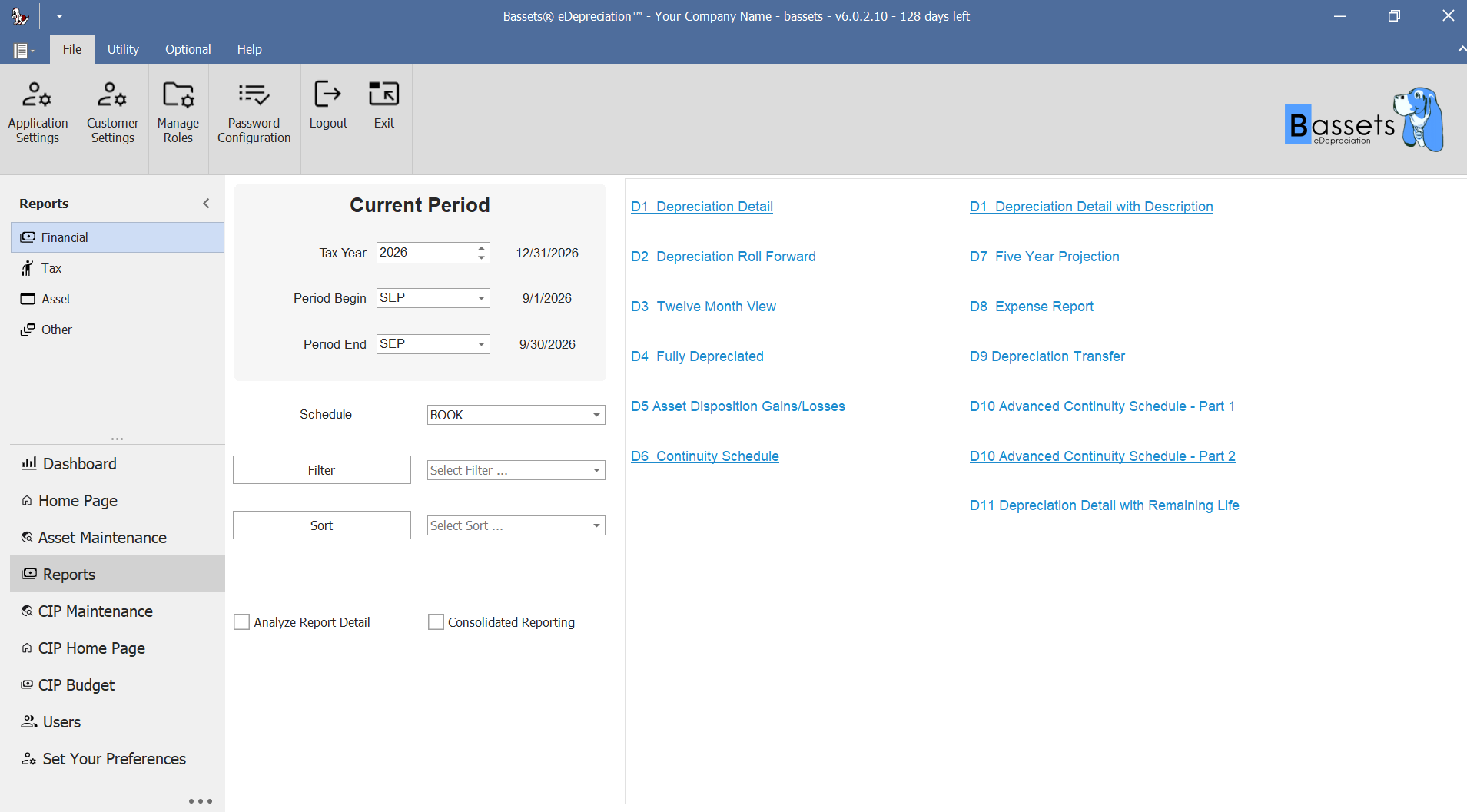
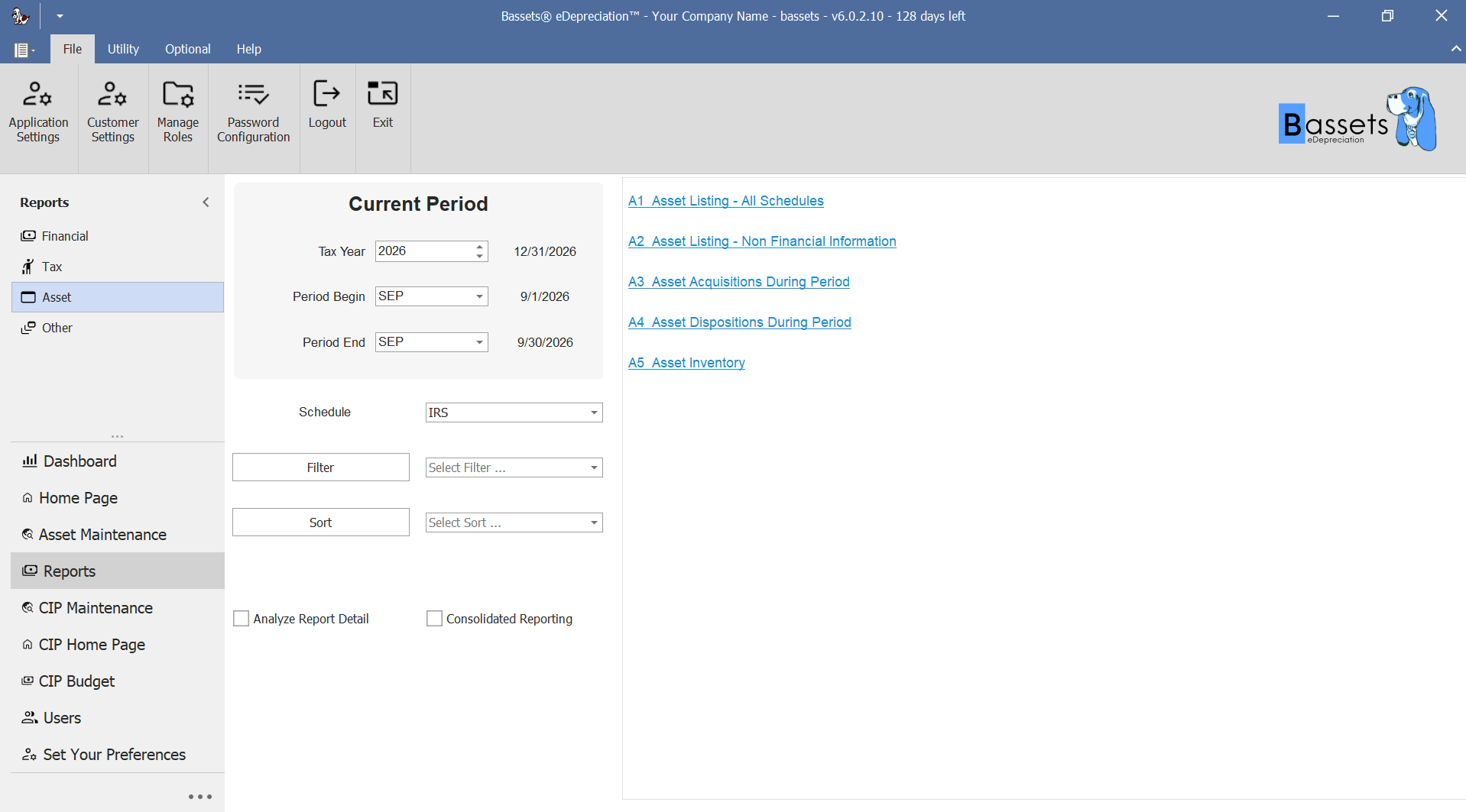
In Bassets eDepreciation, reporting can be run for different schedules and accounting periods, with filtering, sorting, and consolidated reporting options available from the reporting workspace.
What Should Fixed Asset Reports Include?
The fields depend on the purpose of the report. A depreciation detail report needs different information from an acquisition report or disposal report. Common reporting fields can include:
- Asset number or other unique identifier
- Asset description and classification
- Acquisition or placed-in-service date
- Depreciation method and useful life
- Depreciable basis
- Current-period depreciation
- Accumulated depreciation
- Net book value
- Transfer or disposal information when relevant
- The accounting period or schedule being reported
A report should contain the information needed for its accounting purpose without forcing the reviewer to rebuild the answer in a separate spreadsheet.
Essential Fixed Asset Reports for Accounting Teams
Most finance teams need a set of repeatable reports rather than one universal fixed asset report. The table below groups the main reporting jobs and the questions they help answer.
Asset Listing, Acquisition, and Inventory Reports
Asset reports help finance verify the population behind depreciation and reporting. Useful outputs answer questions such as:
- Which assets are currently recorded?
- Which assets were added during the period?
- Which assets were disposed of during the period?
- What nonfinancial or inventory information is associated with the asset record?
The current Bassets reporting workspace includes Asset Listing, Asset Acquisitions During Period, Asset Dispositions During Period, and Asset Inventory options.
Depreciation Detail and Summary Reports
Depreciation reporting is central to fixed asset accounting because reviewers need both asset-level detail and summarized balances. A detailed report can help finance inspect the calculation inputs and outputs behind an individual asset, while summary views make period totals easier to review.
For teams that need a refresher on methods, basis, useful life, and related depreciation concepts, see What Is Depreciation? before using the report output for review.
The supplied Bassets Depreciation Detail report shows fields including service date, depreciation method, life, depreciable basis, prior accumulated depreciation, period depreciation, total accumulated depreciation, and net book value.
.png)
Depreciation Expense and GL Reports
Period-end reporting also needs to connect fixed asset activity with the accounting process. A depreciation expense or journal-entry report helps answer two practical questions:
- What depreciation expense was calculated for the period?
- What fixed asset information needs to be reviewed or transferred into the GL workflow?
Bassets lists a Fixed Asset Depreciation Expense Journal Entry among its standard reports and states that eDepreciation can export and integrate fixed asset records with general ledger accounting software. The accounting team should still reconcile the fixed asset output to the GL as part of its normal close controls.
Transfer and Disposal Reports
Transfers and disposals change the financial history of an asset, so they should be visible in reporting rather than handled only through offline notes. Reporting can help finance review:
- Assets transferred during the period
- Assets disposed of during the period
- Disposal gain or loss
- The depreciation impact of lifecycle activity
Bassets currently identifies Transferred Asset Report, Asset Disposal, and Disposal - Gain/Loss among its report options.
Historical and Projection Reports
Fixed asset reporting also needs a time dimension. Historical reports help reviewers reproduce prior-period information, while projections help finance understand how existing assets are expected to affect future depreciation.
Bassets states that reports can be generated for past, current, and future accounting periods. Current report options also include a Twelve Month View and Five Year Projection.
How Fixed Asset Reporting Supports the Financial Close
During the financial close, fixed asset reports give the accounting team a structured way to review the activity that changed balances during the period. A practical review can include:
- New asset additions and placed-in-service activity
- Current-period depreciation expense
- Accumulated depreciation balances
- Transfers and classification changes
- Full and partial disposals
- Net book values and unusual balances
- Differences that require investigation before posting or sign-off
The reports do not replace reconciliation. They give finance a consistent source for the review. The broader Fixed Asset Accounting Guide explains how asset records, depreciation, journal entries, lifecycle changes, and reconciliation fit together across the accounting process.
Fixed Asset Reporting for Tax and Audit Support
Tax and audit work often requires finance to reproduce the history behind an asset balance or depreciation amount. Organized fixed asset reporting can make that review easier by keeping relevant schedules and transaction information available across periods.
Depending on the question, teams may need to retrieve:
- Historical depreciation information
- Asset acquisition and service dates
- Current and accumulated depreciation
- Transfer and disposal activity
- Gain or loss information
- Supporting schedules for selected assets or periods
Reporting supports the documentation process, but the presence of a software report does not by itself establish accounting, tax, or audit compliance. The organization still needs to apply the appropriate accounting policies, tax rules, and review controls.
Fixed Asset Reports vs. a Fixed Asset Register
A fixed asset register is the underlying organized record of the assets an organization maintains. A fixed asset report is an output created from asset and accounting information to answer a specific review question. For example, the register may contain the asset record, while a depreciation detail report presents the values needed to review depreciation for a defined period.
Reliable reporting depends on reliable source records. Missing service dates, incorrect basis, outdated locations, or incomplete lifecycle activity can carry through into the reports built from that data.
Historical Reporting and Depreciation Forecasting
A current-period report answers what happened now. Finance often needs more context than that. Historical and future-period reporting can support questions such as:
- How did depreciation change from a prior period?
- What will existing assets contribute to depreciation next year?
- How do projected depreciation amounts change across several fiscal years?
- Which assets are approaching the end of their depreciable lives?
Bassets supports reports for past, current, and future accounting periods. Its five-year projection view gives finance a forward-looking schedule by fiscal year, helping teams review the expected depreciation profile of the existing asset population.
.png)
When Standard Fixed Asset Reports Are Not Enough
Standard reports cover recurring needs, but organizations may need to narrow, reorganize, or extend the output for a particular entity, schedule, management request, or review process. Useful reporting controls include:
- Reporting-period selection
- Schedule selection
- Filters and sorting
- Consolidated reporting
- Custom report writing
- Exports for additional analysis or distribution
Bassets provides more than 20 standard reports, supports SQL report writing for customized reports, and states that reports can be exported directly to Excel or saved as Crystal, PDF, Word, and RTF files. See the Bassets reporting page for the current report list and export options.
What to Look for in Fixed Asset Reporting Software
Reporting software should be evaluated against the finance workflows the organization performs repeatedly. Before choosing a system, confirm that it can support:
- Asset-level depreciation detail and summarized reporting
- Acquisition, transfer, and disposal reporting
- Historical reporting and future depreciation projections
- Expense or journal-entry outputs that fit the GL workflow
- The books or schedules the organization actually maintains
- Filtering, sorting, and repeatable report selection
- Custom reporting when standard reports do not answer the question
- Export formats that fit review, audit, tax, and management workflows
For a broader software evaluation framework, the Fixed Asset Management Software Features guide covers depreciation, lifecycle controls, reporting, GL data exchange, migration, scalability, and other finance requirements.
Fixed Asset Reporting with Bassets
Bassets eDepreciation is designed around fixed asset management, depreciation, lifecycle activity, and reporting. Current Bassets product information identifies:
- More than 20 standard reports
- SQL report writing for customized reports
- Reports for past, current, and future accounting periods
- Asset acquisition, inventory, transfer, and disposal reports
- Depreciation detail, summary, journal-entry, and projection reports
- Sort and selection controls
- Exports to Excel, Crystal, PDF, Word, and RTF
The strongest evaluation is to run the reports your finance team already relies on and confirm that the output fits the way you close, reconcile, review, and plan.
Frequently Asked Questions
What is fixed asset reporting?
Fixed asset reporting is the process of turning fixed asset records and depreciation data into reports used for accounting review, reconciliation, tax support, audit support, and planning. Reports can cover asset listings, depreciation, transfers, disposals, book values, and future projections.
What should a fixed asset report include?
The fields depend on the report. Common information includes asset ID, description, service date, depreciation method, useful life, depreciable basis, current-period depreciation, accumulated depreciation, net book value, and relevant transfer or disposal activity.
What are the most important fixed asset reports?
Common reporting needs include asset listings and acquisitions, depreciation detail and summaries, depreciation expense or journal-entry reports, transfer reports, disposal and gain/loss reports, and historical or future-period projections.
What is the difference between a fixed asset register and a fixed asset report?
A fixed asset register is the underlying organized record of the asset population. A fixed asset report uses asset and accounting data to answer a specific question, such as current depreciation, additions during the period, or disposal gain and loss.
Can fixed asset software create depreciation projections?
Purpose-built fixed asset software can support future-period depreciation reporting when the product includes projection capabilities. Bassets eDepreciation supports future projections and includes a five-year projection report among its reporting options.