Fixed asset software can solve very different problems. One finance team may need deeper depreciation and tax functionality; another may prioritize physical asset tracking, ERP integration or remote access. That is why a useful fixed asset software comparison should focus less on naming one universal “winner” and more on matching capabilities to the way your organization actually manages assets.
The best fixed asset software depends on your accounting and tax requirements, asset volume, existing financial systems, reporting needs, tracking requirements, and budget. Bassets, Sage Fixed Assets, Bloomberg Tax Fixed Assets, NetSuite Fixed Assets Management, and Asset Panda each have different strengths, so the best choice is the platform that most closely matches your organization’s fixed asset workflows and priorities.
Fixed Asset Software Comparison at a Glance
The table highlights an important distinction: these products are not interchangeable. Sage and Bloomberg Tax emphasize sophisticated depreciation and tax workflows; NetSuite embeds fixed assets inside a broader ERP; Asset Panda has a strong operational tracking proposition; and Bassets is designed as a dedicated fixed asset management and depreciation platform.
How We Compared Fixed Asset Management Software
For finance teams, a long feature list is less useful than knowing whether a platform can support the workflows that affect financial reporting, tax compliance and audit readiness. This comparison therefore focuses on five areas: depreciation and accounting depth, asset tracking and controls, integrations, deployment and scalability, and total cost of ownership.
For a deeper look at these evaluation criteria, explore the features to look for in fixed asset management software.
Accounting and Depreciation Capabilities
Start with the depreciation engine. Confirm that each system supports the methods, books, conventions, tax treatments, transfers, disposals and reporting requirements your organization uses today, and those it may need as it grows. Multi-book requirements are especially important when financial, federal tax, state tax and management reporting require different treatments.
Asset Tracking and Controls
Accounting accuracy depends on the underlying asset register. Evaluate how the platform records asset history, transfers, disposals, location changes and physical inventory. If barcode or mobile scanning is central to your control environment, give those capabilities more weight than a finance team whose primary concern is depreciation and reporting.
Integrations and Existing Finance Systems
Map how asset data needs to move into and out of your general ledger, ERP, tax and reporting systems. A native ERP module can reduce system boundaries, while dedicated fixed asset software may offer more specialized functionality. The better choice depends on whether integration simplicity or fixed-asset depth is the higher priority.
Deployment, Scalability and Usability
Consider where the software runs, how distributed teams access it, and how pricing or product tiers change as asset volumes grow. Scalability should be evaluated against your expected asset count, entity structure and user requirements rather than today's portfolio alone.
If remote access and deployment are major selection criteria, our guide to cloud-based fixed asset management software explains what to evaluate beyond simply asking whether a system is available online.
Pricing and Total Cost of Ownership
Subscription or license price is only one part of cost. Migration, implementation, integrations, training, support, additional modules and internal administration can materially change the economics of a system. Compare vendors on a three- to five-year total cost basis wherever possible.
Fixed Asset Software Comparison: 5 Solutions to Consider
1. Bassets
Best suited for: Finance and accounting teams that want a dedicated fixed asset management platform with depreciation, reporting and scalable asset capacity.
Bassets eDepreciation supports historical and future depreciation calculations, complete and partial transfers, disposals, more than 20 standard reports, SQL-based custom reporting, data validation and general ledger expense export. Its Compact, Standard and Enterprise licenses support portfolios of up to 5,000 assets, up to 20,000 assets and unlimited assets respectively.
Bassets also publishes starting prices for its Compact and Standard editions, which makes early-stage budgeting easier. See current Bassets pricing.
What to consider: Bassets is a dedicated fixed asset platform rather than a full ERP. If your organization has made native ERP consolidation the overriding requirement, compare the benefits of a specialist system with an ERP-native fixed asset module before deciding.
Consider Bassets if: Your priority is a dedicated fixed asset environment that combines depreciation, reporting and lifecycle management without requiring a broader ERP implementation.
2. Sage Fixed Assets
Best suited for: Organizations with complex depreciation, tax and fixed asset lifecycle requirements.
Sage documents more than 50 depreciation formulas and up to 20 depreciation books. Its Fixed Assets portfolio is modular: Depreciation handles depreciation and asset data; Planning supports project and capital spending workflows; Tracking adds barcode inventory and Android scanning; and Reporting extends custom reporting. Sage also documents integrations with systems including Sage Intacct, Microsoft Dynamics, SAP, JD Edwards and Oracle.
If Sage is on your shortlist, our Bassets vs Sage Fixed Assets comparison takes a closer look at depreciation, reporting, tracking, deployment, migration and total cost.
What to consider: That breadth is delivered through multiple modules. Buyers should confirm which modules, hosting approach and implementation services are required for their use case rather than assuming every capability is included in a single package.
Consider Sage if: Your organization needs mature depreciation functionality, extensive tax rules and a modular ecosystem that can also support planning and physical tracking.
3. Bloomberg Tax Fixed Assets
Best suited for: Tax-intensive organizations and finance teams where federal and state depreciation complexity is central to the purchase.
Bloomberg Tax positions Fixed Assets as a cloud-based fixed asset subledger. Its current product documentation highlights automated depreciation based on up-to-date tax laws, federal and state tax functionality, scenario modeling, ERP integration, journal-entry automation, standard and custom reports, and up to 99 customizable books. It also states that the platform has no asset or record limits.
What to consider: Bloomberg Tax's public proposition is strongly tax-led. Organizations whose primary challenge is field inventory, custody or mobile scanning should make sure operational tracking requirements receive equal attention during evaluation.
Consider Bloomberg Tax if: Tax depreciation, state conformity, modeling and tax-law updates are among your most demanding fixed asset requirements.
4. NetSuite Fixed Assets Management
Best suited for: Organizations already operating within the NetSuite ERP ecosystem.
NetSuite Fixed Assets Management covers acquisition, depreciation, revaluation, transfer, disposal and asset splitting. Oracle documents standard and user-defined depreciation methods, multiple depreciations per asset, monthly and daily depreciation, component depreciation, tax methods and lease management. Because the module sits within NetSuite, fixed asset activity can remain closely connected with the organization's accounting environment.
What to consider: The strongest argument for NetSuite FAM is its ERP context. Organizations that are not already using NetSuite should compare the broader platform commitment with the flexibility and scope of a dedicated fixed asset system.
Consider NetSuite if: Native connection to your existing NetSuite financial environment is more important than introducing a specialist fixed asset platform.
5. Asset Panda
Best suited for: Organizations prioritizing mobile asset visibility, barcode-based inventory and configurable operational workflows.
Asset Panda combines web and mobile asset management with barcode scanning, lifecycle history and offline mobile access. Its current fixed asset product also supports five depreciation methods and automated depreciation calculations, making it more finance-capable than a tracking-only tool. Asset Panda documents integrations including Oracle NetSuite and QuickBooks Online.
What to consider: Asset Panda's depreciation capabilities should be compared with the deeper method, book and tax functionality documented by specialist depreciation platforms when accounting complexity is the primary buying driver.
Consider Asset Panda if: Physical visibility, mobile workflows and asset accountability are central requirements, with depreciation functionality supporting those operational processes.
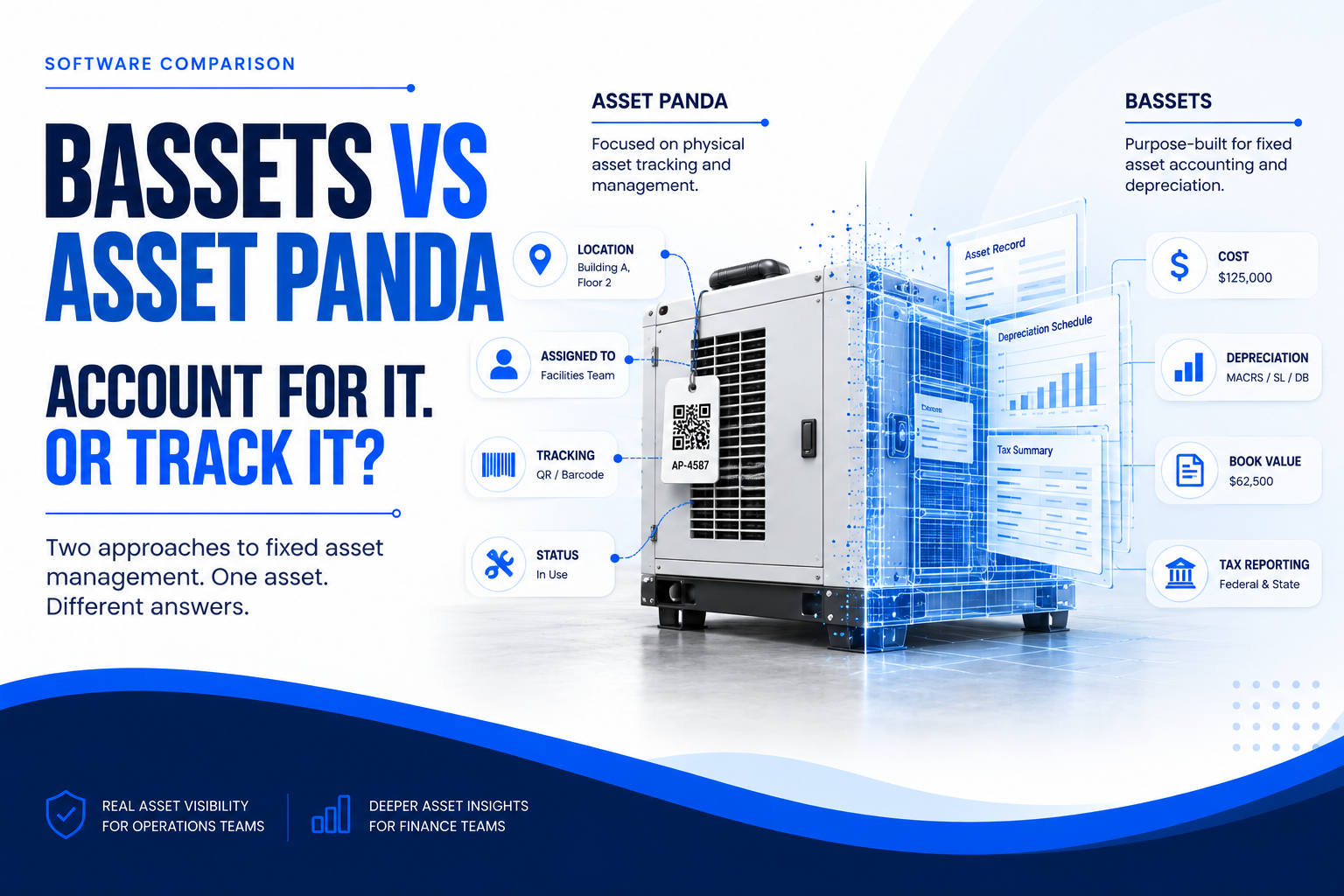
Fixed Asset Accounting Software vs. Asset Tracking Software
Fixed asset accounting software and asset tracking software overlap, but they usually begin with different problems. Accounting-focused platforms prioritize depreciation, tax treatment, reporting, general ledger workflows and audit support. Tracking-focused platforms prioritize where an asset is, who has it, its condition and how teams interact with it in the field.
Choose accounting-focused software when multi-book depreciation, tax calculations, book-to-tax reporting, financial controls and close processes drive the purchase. Choose tracking-focused software when barcode or QR scanning, mobile inventory, custody, location and operational visibility are the dominant concerns.
Many organizations need elements of both. The key is to identify which requirement should drive the buying decision, then confirm that the shortlisted platform is strong enough in the secondary requirement.
How Much Does Fixed Asset Software Cost?
Fixed asset software pricing varies because vendors use different combinations of user counts, asset volumes, modules, implementation services and custom quotes. Bassets currently publishes Compact pricing from $9.99 per user per month for up to 5,000 assets, Standard pricing from $19.99 per user per month for up to 20,000 assets, and Enterprise pricing from $29.99 per user per month for unlimited assets. Other vendors in this comparison may require a quote for the configuration you need.
For a meaningful fixed asset software cost comparison, look beyond the headline subscription or license. A lower software price can still result in a higher total cost if migration, integrations, training or administration require substantial additional effort.
Dedicated Fixed Asset Software vs. an ERP Fixed Asset Module
A dedicated platform may make more sense when fixed assets are complex enough to require specialist depreciation, tax, reporting or asset-management functionality that extends beyond the standard capabilities of your ERP. It can also give finance teams more flexibility when fixed asset requirements span multiple accounting or operational systems.
An ERP-native module may make more sense when your organization already operates on that ERP and reducing system boundaries is the priority. NetSuite FAM is a good example: its value is not only its fixed asset functionality, but the ability to keep asset activity within the NetSuite financial environment.
Neither architecture is automatically better. Compare the depth of functionality you need with the integration, governance and administration implications of adding another specialist platform.
How to Choose the Right Fixed Asset Software
- Define your accounting and tax requirements. Document every depreciation method, book, tax treatment and reporting requirement the system must support.
- Establish asset, entity and user requirements. Evaluate today's volume as well as expected growth, locations, subsidiaries and concurrent users.
- Map your tracking requirements. Decide whether physical inventory, barcode scanning, custody and mobile workflows are must-haves or secondary capabilities.
- Identify required integrations. Include the general ledger, ERP, purchasing, tax and reporting systems that exchange asset data.
- Evaluate reporting and controls. Test standard reports, audit trails, transaction history, permissions and reconciliation workflows.
- Review migration and implementation. Confirm how historical depreciation data will be imported, validated and reconciled before go-live.
- Compare total cost of ownership. Include software, services, migration, integration, training, support and internal administration.
- Calculate expected ROI. Estimate the manual effort, reporting delays and reconciliation work the new system should reduce.
For a more detailed evaluation process, follow our step-by-step guide to choosing the right fixed asset software.
How to Calculate the ROI of Fixed Asset Software
ROI should compare the cost of the new system with the financial and operational burden of the current process. Relevant benefits can include less manual depreciation work, faster reporting, fewer reconciliation corrections, improved asset visibility, reduced spreadsheet administration and more efficient audit preparation.
Start by estimating the hours spent maintaining asset records, calculating depreciation, reconciling balances, producing reports and responding to audit requests. Add the expected implementation and ongoing software costs, then model the time and process savings over the same period.
You can also use the Bassets ROI Calculator to estimate the potential financial impact using your own requirements.
Frequently Asked Questions About Fixed Asset Software Comparison
What should I compare when evaluating fixed asset software?
Compare depreciation and accounting capabilities, asset tracking, reporting, integrations, deployment, scalability, implementation requirements, support and total cost of ownership. Weight each factor according to the workflows that create the most financial or operational risk for your organization.
What is the best fixed asset software for depreciation?
The best option depends on the depreciation methods, books and tax treatments you require. Specialist platforms such as Bassets and Sage emphasize dedicated depreciation functionality, while Bloomberg Tax has a particularly tax-focused proposition. Validate your exact methods and reporting requirements during demos.
Is dedicated fixed asset software better than an ERP fixed asset module?
Not always. Dedicated software can provide deeper fixed asset functionality, while an ERP module can simplify integration and administration for organizations already using that ERP. The right choice depends on whether specialist capability or native ecosystem integration matters more.
How much does fixed asset management software cost?
Pricing varies by vendor, users, asset volume, modules and implementation requirements. Compare total cost of ownership rather than subscription price alone, including migration, integrations, training, support and internal administration.
What is the best fixed asset software for CPA firms?
CPA firms should prioritize multi-client or multi-entity management, tax depreciation, reporting, data separation, scalability and integration with their existing tax and accounting stack. The best platform depends on whether the firm's work is primarily tax-focused, reporting-focused or broader fixed asset management.
See Whether Bassets Fits Your Fixed Asset Requirements
A software comparison should narrow your shortlist, not replace a real product evaluation. Once you have identified your must-have depreciation, reporting, tracking and integration requirements, test your finalists against your own asset scenarios and historical data.